
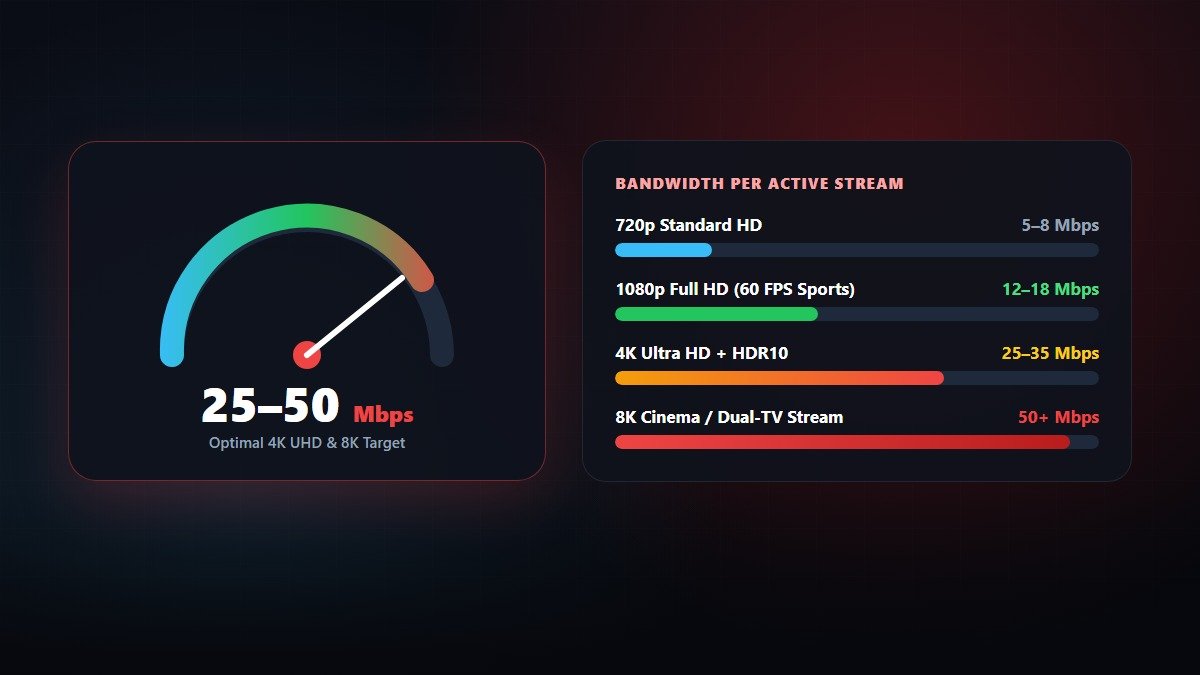
1. Exact Download Speed Per Stream Resolution
Unlike on-demand files that pre-buffer 60 seconds ahead, live broadcasts play near real time. Every resolution tier requires consistent, uninterrupted throughput directly at your television:
| Stream Quality | Minimum Speed | Recommended Target |
|---|---|---|
| 720p Standard HD | 5 Mbps | 8 – 10 Mbps |
| 1080p Full HD (60fps Sports) | 12 Mbps | 18 – 20 Mbps |
| 4K Ultra HD + HDR10 | 25 Mbps | 35+ Mbps |
| 8K Ultra-High Bitrate / Dual Screens | 50 Mbps | 75 – 100 Mbps |
2. Why Live Football & F1 Need More Bandwidth Than VOD
Fast-motion live sports broadcasts (Premier League, Champions League, Formula 1, NBA) transmit 50 or 60 frames every second with rapid camera pans across crowds and turf. During sudden motion bursts, HEVC/H.264 bitrates spike briefly from 15 Mbps up toward 28 Mbps — which is why aiming for 35+ Mbps per 4K TV keeps action razor sharp.
3. Budgeting Bandwidth for Multi-Device Homes
Running two TVs on a Two Accounts subscription while family members browse phones or game online adds up quickly. Multiply 30 Mbps per active 4K screen plus 20 Mbps spare headroom for background smart-home devices and cloud backups.
4. Stability Beats Raw Speed (Ping, Jitter & 5GHz)
- Test Speed ON the TV itself: A phone sitting next to your router might read 300 Mbps while a Smart TV behind two brick walls on 2.4GHz only gets 9 Mbps.
- Prefer 5GHz Wi-Fi or Gigabit Ethernet: Cuts packet jitter dramatically for live 60fps sports feeds.
- Beat Evening Throttling: Use a VPN with Yes, Using VPN selected at checkout (see our anti-freeze optimization steps or try a free 24-hour test) to confirm peak-hour throughput.
Frequently Asked Questions
Is 25 Mbps fast enough for 4K live TV?+
Does using a VPN slow down 4K streaming speeds?+
Why does 4K stutter when my speed test says 100 Mbps?+
Ready to Test 4K Live Streaming Free for 24 Hours?
Evaluate stream speeds, global channels, and sports stability on your own screen before committing.